Most founders need a system that works hand-in-hand with their business, but end up stuck in a Notion graveyard. Starting projects without a clear plan or outcome is one of the most common mistakes founders make in Notion. Without boundaries, the system sprawls and quietly stops doing what it was built for.
As part of our Lunch & Learn series, we invited Notion expert Tim Jeffries from Smooth Ops Consulting to lead a session on how to build Notion pages that align with your business and turn day-to-day workflows from chaotic into efficient.
Tim walked us through everything: figuring out what your business actually needs, building a minimum viable Notion setup, mapping your digital operating system, and where Notion AI and agents fit into the picture.
If you'd like to join in-person mentoring with our Lunch & Learn mentors and hear about opportunities before they go public, you can join our [NEXT] Founder Community.
Where Do You Start?
Don't Start with The Tool
People assume that having the tool means they can do anything. Then they blame the system when it goes wrong. They ask, "What can Notion do for me?", but that's the wrong question. The right one is, "What does the business need?"
There are three things you need to identify before starting in Notion:
- Outcome: the actual result you're looking for.
- Components: the pieces you need to get there. Clients, projects, tasks, status, people.
- Connections: the workflows linking those components. These need to be intentional, not accidental.
How to really start?
After working with dozens of teams, Tim landed on six core databases that almost every organisation needs: Companies, People, Projects, Tasks, Meetings, and Knowledge. Start here, make them your own, and build from there. Every business is different, but the bones behind every organisation are consistent. Tim calls these The Starting Six.
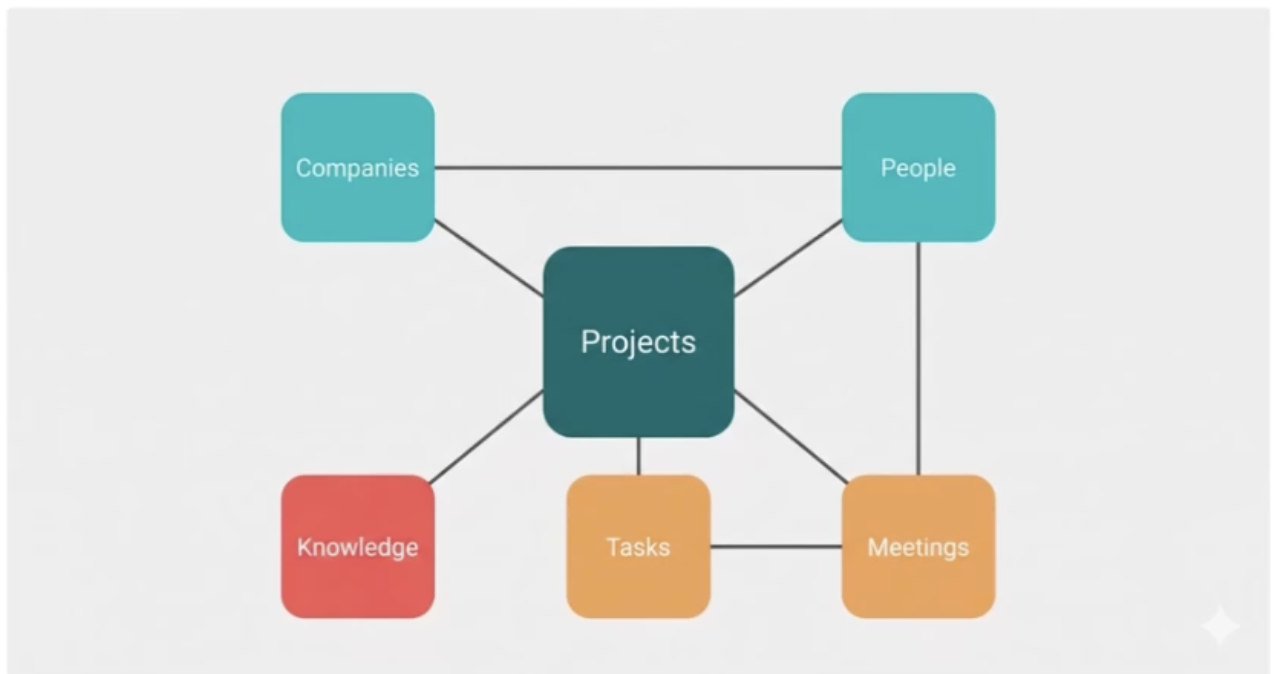
- Companies: the organisations your business deals with. Mostly clients, suppliers, and partners, all in one place. Tim's advice is to keep it generic and consolidated. Have as few as possible, but as many as you need. Start with one Companies database and only split it when the differences between client, supplier, and partner become genuinely hard to manage together.
- People: the humans connected to those companies. The most common early mistake is not grouping and segmenting people properly. Linking them to companies creates the interconnected web where one company surfaces all of its related contacts.
- Projects: the spine of the whole system. Everything relates back to projects. Tim defines projects broadly on purpose: the container, the grouping of the work. Start with one Projects database and split only when the differences between project types become genuinely too hard to manage together.
- Tasks: the granular, day-to-day actions connected to your projects. The actual actions tied to a project. What used to be a sticky note. Only add properties like priority or urgency if your team will actually use them. Unused fields are just friction.
- Meetings: where your calendar and workspace connect. Tim's key point here is avoiding duplicate records. Your Meetings database links back to People, Projects, and Tasks so everything stays in one place.
- Knowledge: the catchall for reference information that doesn't belong anywhere else. Unstructured information builds up in the corners of every business. The Knowledge database is where it lives.
Keeping a Minimum Viable Operating System
People tend to over-engineer Notion. As Tim says, we're not building a spaceship, we're building a skateboard. The point: that's all you need to get going. Start simple and add complexity later. If you're building a system, set your priorities. It's a balance between what you need and what you can use.
Here's a template to get you started
AI in Notion
Before you use AI, you need a structured system. If your databases are in chaos, you're likely making the agent hallucinate, and we don't want that. You can't leverage AI or build effective agents if there's no structured system behind the scenes for them to work on.
The process should be run by you, and AI does the heavy lifting.
How to Let AI Do Its Role:
- Set up your personal instructions. This is the foundation that everything else sits on. Every time you open a new chat, the AI loads those instructions first, which means it already knows your context, your preferences, and where everything lives before you've typed a single word.
- Talk to it like a colleague, not a search engine. Once your instructions are in place, you don't need to over-engineer your prompts. A voice-to-text shortcut is often enough.
- Build smarts into your skills, not your prompts. When you're crafting skills, go beyond the basics. Give the AI ways to cross-reference its own work, check for consistency, and course-correct before it hands anything back to you.
- Stop rebuilding context from scratch every chat. One of the most common frustrations with AI tools is having to re-explain everything at the start of a new conversation. The fix is well-built skills, which are focused, clearly-scoped instructions that define exactly what the AI needs to do and the output it's working toward.
That's the framework. Now it's your move. Open your workspace and see what needs to change.
Additional Resources
Tim put together a Personal Agent Starter Kit to help you get your instructions right from the start, tested patterns, clear examples, and a practical framework to make your Personal Agent work the way your business actually thinks.
If this Lunch & Learn session got you thinking, Notion in Practice is the podcast worth adding to your list. Each episode features real founders, consultants, operators, and marketing leaders sharing how they actually build and scale their workflows in Notion
Want bite-sized Notion tips straight to your inbox? Tim shares quick, practical insights on systems, workflows, and making Notion actually work for your business — no fluff, just the good stuff. Subscribe here: https://substack.com/@smoothopsconsulting
Dive deeper on the practical tips, Notion 101 full video is available on YouTube.